


 Back
to listing
Back
to listing
Student Information System vs Education ERP: What’s the Difference?
Student Information System vs Education ERP: What’s the Difference?
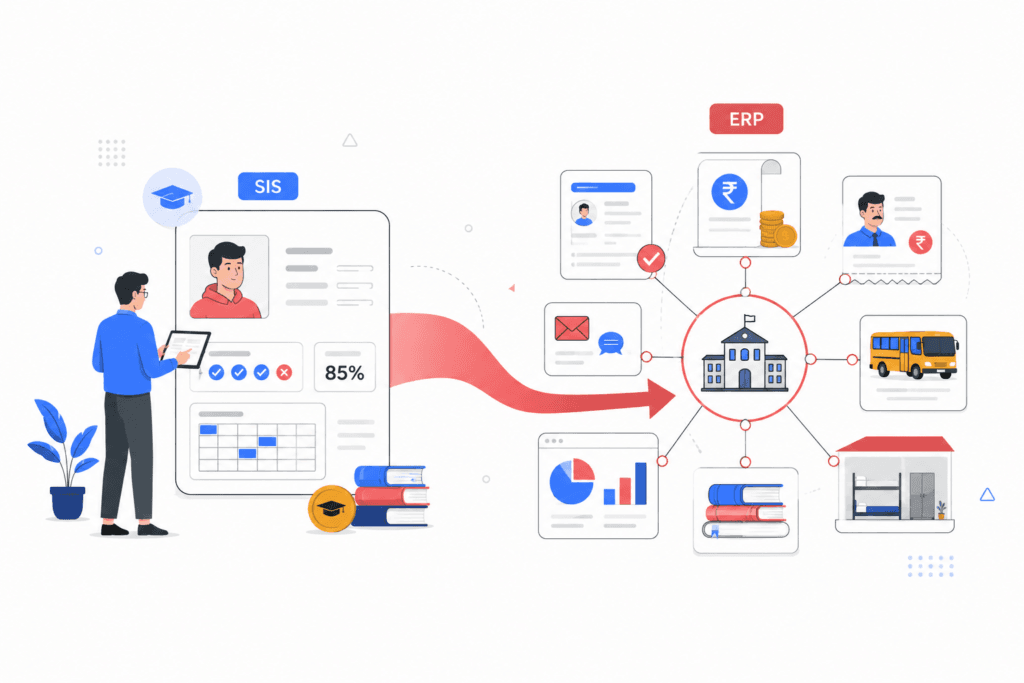
A college says it already has an ERP.
But admissions ends in a spreadsheet. Fee collection is managed separately. Payroll sits in an accounting tool. Transport operates through calls and messaging groups. The “ERP” itself mainly stores student profiles, attendance and examination results.
At another institution, management purchases a Student Information System expecting it to eventually handle HR, payroll, hostel allocation, accounting and institution-wide reporting.
Both situations come from the same problem: a Student Information System and an education ERP are being treated as interchangeable systems.
They are not.
The confusion is understandable because terms such as SIS, ERP, school software, college software and campus software are often used loosely. But the distinction matters when an institution is deciding what technology should become its operational backbone.
A Student Information System (SIS) is primarily built around the student and the student lifecycle.
An education ERP goes further. It connects student information with the institution’s academic, administrative, financial and operational processes.
Understanding the difference can prevent institutions from buying a system that solves only part of the problem they actually have.
What is a Student Information System?
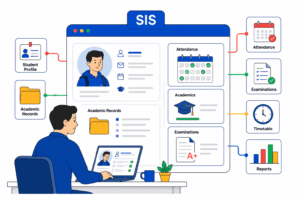
A Student Information System, commonly called an SIS, is a centralized system for storing and managing information related to students.
Its primary purpose is to maintain an accurate student record throughout the academic lifecycle.
Depending on the platform, an SIS may manage:
- student profiles and demographic information;
- enrolment and registration;
- class and section allocation;
- attendance;
- academic records;
- marks and grades;
- examination history;
- timetable information;
- certificates and documents;
- basic parent or student access.
At its core, an SIS answers questions such as:
Who is this student?
Which programme, class or section are they enrolled in?
What is their attendance record?
How are they performing academically?
For an institution whose main requirement is maintaining accurate student and academic records, this can be exactly what is needed.
The limitation appears when the institution expects the SIS to also become the operating system for finance, employees, infrastructure and other campus functions.
What is an education ERP?
An education ERP takes a broader institutional view.
Rather than organizing everything around one entity—the student—it connects multiple departments and workflows through a common platform.
Depending on the institution and product, an education ERP may bring together:
- admissions;
- student records;
- academics;
- attendance;
- examinations;
- fees and finance;
- HR and payroll;
- LMS activities;
- library operations;
- transport;
- hostel management;
- communication;
- inventory and assets;
- reporting and analytics.
The important difference is not simply that an ERP has “more features.”
The real difference is scope and integration.
A fee payment can update the student’s financial record.
An admission can create the student record without staff entering the same details again.
Attendance can flow into academic reporting.
Employee attendance can connect with payroll.
Examination data can feed report cards and management analytics.
Leadership can review information across departments without requesting separate spreadsheets from each team.
That is what makes an ERP fundamentally different from a student-only system.
Student Information System vs Education ERP: Quick Comparison
| Area | Student Information System | Education ERP |
|---|---|---|
| Student profiles | Core function | Included |
| Enrolment | Core function | Included |
| Attendance | Usually included | Included |
| Academics | Core function | Included |
| Examinations | Usually included | Included |
| Admissions | May be included | Usually integrated |
| Fees | Basic or varies by platform | Broader fee and finance workflows |
| Accounting | Usually outside SIS scope | Can be integrated |
| HR | Usually separate | Included in broader ERP scope |
| Payroll | Usually separate | Can be integrated |
| LMS | Often separate | Native or integrated depending on vendor |
| Transport | Usually separate | Can be included |
| Hostel | Usually separate | Can be included |
| Library | May require another system | Can be integrated |
| Reporting | Mainly student and academic | Institution-wide |
| Management analytics | Limited | Cross-department visibility |
| Primary focus | Student lifecycle | Entire institution |
The overlap explains why the two are frequently confused.
Both may handle students, attendance, academics and examinations.
The difference becomes much clearer once you move beyond the classroom.
1. Student records: where SIS is strongest
Student information management is the natural strength of an SIS.
It provides a structured student record that can follow an individual from admission or enrolment through academic progression and completion.
For academic teams, this creates one place to access information such as:
- programme;
- class;
- section;
- roll number;
- attendance;
- marks;
- grades;
- academic history;
- documents.
An education ERP normally includes this capability as well.
The distinction is what happens to that information elsewhere.
In an integrated ERP environment, the same student record can also support admissions, fee collection, transport, hostel, communication and institutional reporting.
The student record becomes part of a wider operational system rather than an isolated academic database.
2. Admissions and enrolment
Some Student Information Systems begin once a student is formally enrolled.
That can create a break between the admissions process and the student record.
For example, applicant information may be collected through forms or spreadsheets and then entered again after admission.
An education ERP can connect the stages more closely:
Enquiry → Application → Document verification → Selection → Fee payment → Enrolment → Student record
This reduces duplicate entry and gives administrators greater visibility into the complete admissions funnel.
For institutions processing high application volumes, this distinction can become significant.
3. Attendance and academics
Attendance is one area where both an SIS and ERP may perform very well.
Teachers can record attendance, administrators can monitor percentages and students or parents may be able to view attendance information.
But an ERP can connect attendance with broader workflows.
For example:
- administrators can identify attendance exceptions;
- academic teams can compare attendance with performance;
- management can review attendance trends across departments;
- alerts can be triggered when students cross defined thresholds.
The difference is therefore less about capturing attendance and more about how attendance data can be used across the institution.
4. Fees and finance
Fees are often one of the clearest dividing lines between an SIS and a full ERP.
An SIS may display a student’s fee status or provide basic fee collection functionality.
An ERP can support a much broader financial workflow, including:
- fee structures;
- instalments;
- concessions;
- scholarships;
- online payments;
- receipts;
- outstanding dues;
- defaulter tracking;
- collection reports;
- reconciliation;
- finance dashboards.
This matters because fee information does not exist independently of student information.
When the systems are disconnected, finance teams may have to reconcile payment records with enrolment records manually.
Integration reduces that gap.
5. HR and payroll
Students are only one part of an educational institution.
Schools, colleges and universities also manage teachers, administrators, finance staff, support staff and other employees.
HR and payroll are normally outside the primary scope of a traditional SIS.
An education ERP can extend into:
- employee records;
- attendance;
- leave;
- payroll;
- departments;
- roles;
- workload;
- salary processing;
- employee documents.
For management, this creates a more complete view of institutional resources instead of maintaining separate student and employee systems.
6. LMS and learning activities
An SIS and a Learning Management System solve different problems.
The SIS maintains the formal student record.
The LMS manages the learning experience—content, assignments, assessments, courses and engagement.
Some education ERP platforms provide an integrated LMS, while others connect with an external LMS.
Institutions should therefore ask a specific question when evaluating systems:
Does the LMS operate separately, or does learning activity connect with the same student and academic data used elsewhere?
The answer affects how easily administrators and academic leaders can create a complete view of student progress.
7. Examinations and results
Both SIS and ERP platforms can manage examination information.
However, institutional examination workflows can become complex, particularly when they involve:
- multiple assessment types;
- different grading structures;
- examination scheduling;
- marks entry;
- approvals;
- report cards;
- result publishing;
- backlogs;
- progression rules.
An education ERP can connect these examination processes with student records, attendance, courses and reporting.
Instead of results becoming another isolated dataset, they contribute to a wider academic picture.
8. Transport, hostel and library operations
Transport, hostel and library functions illustrate the difference between student administration and institutional operations.
An SIS may store information such as a student’s bus route or hostel allocation.
But managing the underlying operation is different.
A wider ERP can support workflows such as:
Transport
- routes;
- stops;
- vehicles;
- student allocation;
- drivers;
- transport fees.
Hostel
- rooms;
- occupancy;
- student allocation;
- hostel fees;
- resident records.
Library
- catalogue;
- issue and return;
- overdue items;
- student and staff access;
- transaction history.
These functions may not be essential for every institution. But where they are important, expecting a student-only system to manage them comprehensively can lead to disappointment.
9. Reporting: student view vs institutional view
Reporting is one of the easiest ways to understand the difference between SIS and ERP.
An SIS is naturally strong at student-focused reporting.
Examples include:
- student attendance;
- academic performance;
- enrolment;
- grades;
- student history.
An ERP should be capable of extending reporting across departments.
Management may need to review:
- admissions conversion;
- fee collections;
- outstanding dues;
- student attendance exceptions;
- examination performance;
- faculty workload;
- payroll;
- transport utilisation;
- hostel occupancy;
- department-level performance.
For a teacher, the important question may be:
Which students were absent today?
For a registrar:
How is student progression changing across programmes?
For a finance head:
How much fee is outstanding?
For institutional leadership:
Where are the exceptions that require management attention?
A broader ERP is designed to connect these different perspectives.
10. The biggest difference: one system of record vs one operating environment
This is the most important distinction in the Student Information System vs Education ERP discussion.
An SIS can become the institution’s student system of record.
An education ERP is intended to become a broader operating environment for the institution.
That does not make ERP automatically better.
It simply means the systems solve different scopes of problems.
If your institution genuinely needs only student records, academics and attendance, an SIS may be the simpler and more appropriate solution.
If multiple departments depend on disconnected systems and staff repeatedly move the same information between them, the institution may need something broader.
When is a Student Information System enough?
An SIS can be the right choice when:
- the primary requirement is student record management;
- attendance and academics are the main priorities;
- finance already works effectively in another system;
- HR and payroll do not need integration;
- transport or hostel operations are limited or irrelevant;
- management does not require extensive cross-department reporting;
- existing integrations work reliably.
Buying a larger platform simply because it has more modules can introduce unnecessary complexity.
Technology should match the institution’s actual operating requirements.
When should an institution consider an education ERP?
An education ERP becomes more relevant when an institution starts experiencing problems such as:
The same data is entered repeatedly
Student information is entered during admissions, again in the student database, again for fees and perhaps again for transport.
Departments maintain separate versions of the truth
Admissions has one number.
Accounts has another.
Academic administration has another.
Management spends time determining which figure is correct.
Reporting depends heavily on spreadsheets
Every management meeting requires teams to export, combine and clean information manually.
Leadership cannot see institution-wide performance
Student data may be available, but there is no unified picture across academics, finance, HR and operations.
The institution is expanding
Multiple campuses or branches make disconnected systems increasingly difficult to maintain consistently.
Administrative work is growing faster than enrolment
Staff spend more time reconciling information, following up internally and correcting duplicate records.
These are signs that the issue is no longer simply student information management.
It is institutional process integration.
8 questions to ask before choosing an SIS or education ERP
Before selecting a platform, involve the teams that will actually use it and answer these questions.
1. What problem are we trying to solve?
Is the priority student records, or are there broader operational problems involving finance, HR, admissions and reporting?
2. How many systems are currently in use?
List the systems, spreadsheets and manual processes used by each department.
3. Where is information being entered more than once?
Duplicate entry is often one of the strongest indicators of fragmentation.
4. Which teams need access to the same information?
Look for workflows that cross admissions, academics, accounts and administration.
5. What reports does leadership require?
A system that works well for teachers may still be inadequate for registrars, directors or management.
6. Which integrations are essential?
Payment gateways, accounting tools, biometric systems, LMS platforms and other services may need to connect with the chosen solution.
7. What will happen as the institution grows?
Consider programmes, campuses, students, staff and reporting requirements—not simply today’s enrolment.
8. How will existing data be migrated?
Ask vendors to explain migration, validation, implementation, training and support before signing the contract.
A feature demonstration is not enough.
Institutions need to understand how the system will function with their own processes and data.
Student Information System vs Education ERP: Which should you choose?
There is no universal answer.
Choose an SIS when your primary requirement is to manage the student lifecycle accurately and efficiently.
Consider an education ERP when the problem extends beyond students and requires admissions, academics, fees, employees, operations and reporting to work together.
A useful way to frame the decision is:
An SIS tells you what is happening with the student. An education ERP helps you understand and manage what is happening across the institution.
The wrong choice is not necessarily buying an SIS or buying an ERP.
The wrong choice is buying one while expecting it to behave like the other.
Where EDU fits
EDU is designed as a broader education platform rather than a standalone student database.
It brings student information together with areas such as admissions, academics, examinations, fees, HR and payroll, LMS, communication, transport, hostel, library and institutional reporting.
The goal is not to add another system to an institution’s existing collection of disconnected tools.
It is to help schools, colleges and universities operate with a more consistent source of information across departments.
Explore EDU at eduerp.ai or book a demo to see how the platform fits your institution’s workflows.
Final takeaway
The Student Information System vs Education ERP decision is ultimately a decision about scope.
If the institution primarily needs an accurate digital record of every student, an SIS can solve that requirement effectively.
If the institution needs student data to connect with admissions, fees, employees, academics, LMS, examinations and campus operations, a broader ERP may be the more appropriate foundation.
Start with the processes your institution needs to connect—not the terminology on the vendor’s brochure.
That is the simplest way to determine which system you actually need.
Frequently Asked Questions
What is the main difference between a Student Information System and an ERP?
A Student Information System primarily manages student records and academic information. An education ERP has a broader scope and connects student information with administrative, financial, employee and operational processes.
Is an SIS part of an education ERP?
It can be. Many education ERP platforms include student information management as one of their core functional areas.
Is an education ERP just an SIS with more modules?
Not exactly. The important difference is not simply the number of modules. An ERP is designed around cross-department processes and integrated institutional data, while an SIS is primarily centred on the student lifecycle
Does every education ERP include an LMS?
No. Some platforms include a native LMS, while others integrate with a separate learning platform. Institutions should verify this with the vendor.
Can an institution integrate its existing SIS with an ERP?
Potentially, yes. The feasibility depends on both systems’ APIs, data architecture and integration capabilities. The institution should evaluate whether information can move reliably between the systems without ongoing manual reconciliation.