

 Back
to listing
Back
to listing
Parent Portal for Schools: How to Improve Communication Between Schools and Families
How a Parent Portal Improves Communication Between Schools and Families
Good parent-school communication is not about sending more messages.
It is about helping the right information reach the right family, at the right time, from an authorised source.
For many Indian schools, that remains harder than it should be.
A homework update may be shared in a WhatsApp group. An absence notice may go through SMS. Fee reminders may be sent by email. A transport update may come through a phone call. Exam schedules may be uploaded as a PDF. A parent-teacher meeting date may still be written in the school diary.
Every channel serves a purpose. But when there is no single source of truth, parents must search across messages, documents, groups, and apps to understand what is happening.
The school faces the same problem from the other side.
Teachers answer questions that have already been answered. The front office receives repeated calls about fees, holidays, attendance, and results. Important notices compete with routine reminders. Parents may act on an old circular because they did not see the updated one. Sensitive concerns may be discussed in informal groups where they do not belong.
A parent portal for schools is designed to solve this communication gap.
It gives parents and guardians secure access to relevant information about their child while helping the school communicate through a structured, trackable, and consistent system.
The need is especially relevant in India in 2026. CBSE’s Parenting Calendar for 2026–27 seeks to institutionalise more structured engagement between schools and parents, with an emphasis on workshops, participation, and holistic student development. Recent public-school initiatives have also used digital channels for attendance alerts, homework, timetables, results, and school information.
But a portal alone does not create better relationships.
Its impact depends on what information it shows, how quickly it is updated, who owns each message, which matters still require a conversation, and whether every family can use it comfortably.
What is a parent portal for schools?
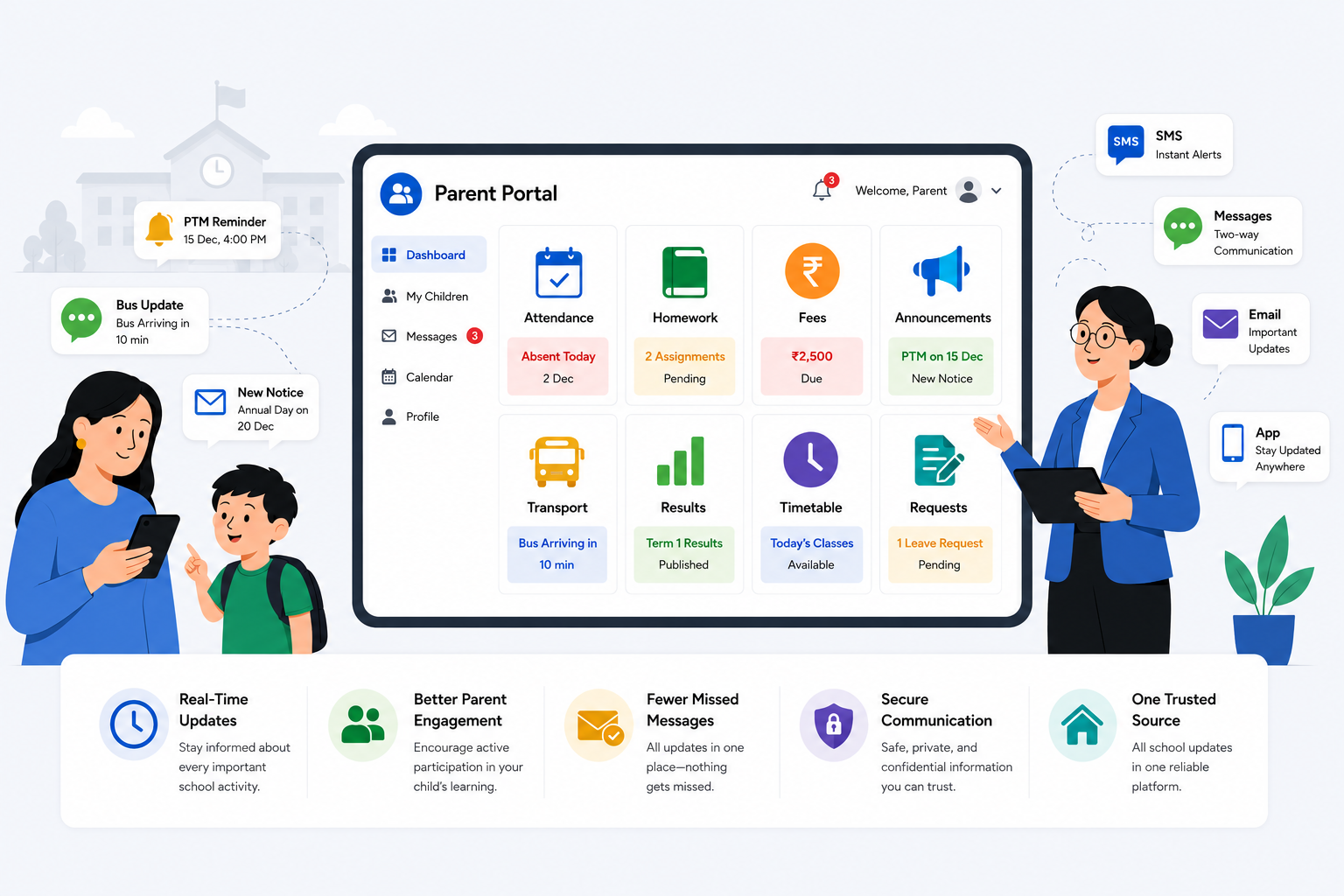
A parent portal is a secure digital platform through which parents or guardians can access school information connected to their child.
Depending on the school’s systems and policies, it may provide access to:
- attendance and absence records;
- homework and assignments;
- timetables and academic calendars;
- assessment results and teacher feedback;
- fee dues, payment links, receipts, and transaction history;
- school announcements and circulars;
- transport routes, live location, or estimated arrival times;
- leave applications and consent requests;
- parent-teacher meeting schedules;
- student documents and profile details;
- event registrations and activity updates.
A parent portal may be accessed through a website, a mobile application, or both.
It should not be confused with a public school website. A website shares general information with everyone. A parent portal provides authenticated, student-specific information only to authorised users.
It should also not be treated as a replacement for teachers, counsellors, school leaders, or parent-teacher meetings.
The portal manages information.
People still manage relationships.
Why school-family communication becomes fragmented
Most schools do not intentionally create a confusing communication process. Fragmentation develops gradually.
One department begins using email for formal circulars. Teachers create WhatsApp groups for quick class updates. The accounts team sends fee reminders through SMS. Transport staff call parents when routes change. The front office handles leave requests and document corrections. Academic coordinators distribute examination schedules as files.
Each choice may appear practical on its own.
The problem emerges when no one defines which channel is the official source for each type of information.
This creates several common situations.
Parents receive the same information more than once
The school may send a notice through the app, SMS, email, and WhatsApp without explaining whether each message is a duplicate or an update.
Important communication becomes noise.
Parents miss information despite receiving many messages
A family may be active in several class and activity groups. A critical circular can disappear between routine posts, acknowledgements, and unrelated replies.
Teachers become permanently available
When personal messaging becomes the default channel, parents may expect teachers to respond at all hours. This creates unclear boundaries and adds administrative work to teaching responsibilities.
Different departments communicate different versions
An exam date may change, but one PDF remains in circulation. Accounts may confirm a payment while the portal still shows a due amount. Transport may update a route without the class teacher knowing.
The school has no communication history
A phone call or personal message may solve an immediate problem, but there may be no record of the request, response, owner, or resolution.
A parent portal creates value by turning these scattered interactions into a more organised communication model.
Some schools ask why they need a portal when WhatsApp already works well enough. WhatsApp is fast, but it has no ownership, no update history, and no way to tell a parent which message is current. A parent portal doesn’t remove WhatsApp — it gives the school one authoritative record that WhatsApp, SMS, and email can point to, instead of each channel carrying its own version of the truth.
How a parent portal improves communication
1. It creates one trusted source of information
The greatest benefit of a parent portal is not speed.
It is consistency.
Parents should not have to determine whether the latest fee notice is in an email, whether the revised timetable is in a WhatsApp group, or whether the attendance record shared by the teacher matches the front-office system.
A connected parent portal draws information from the school’s core records and presents it in one place.
When a parent opens the portal, they should see the current status — not several competing versions.
This is particularly important for information that changes regularly:
- attendance;
- fee dues;
- timetable updates;
- examination dates;
- homework;
- transport status;
- assessment results.
The portal becomes the official record, while SMS, email, and WhatsApp can be used to notify parents that an update is available.
That small distinction matters.
A notification tells the parent to look.
The portal tells the parent what is true.
2. It turns attendance into timely communication
Attendance communication is most useful when it happens early.
A monthly attendance summary may be accurate, but it arrives too late to address a developing pattern. A same-day absence alert gives the family and school an opportunity to verify the student’s safety and understand the reason.
A parent portal can help families:
- confirm daily attendance;
- view late arrivals or partial attendance;
- review recurring absence patterns;
- submit a leave request;
- provide supporting information where required;
- receive escalation messages after repeated absences.
Punjab’s 2026 real-time attendance initiative illustrates this shift toward timely family communication: parents receive absence alerts, while longer periods of absence trigger further contact and intervention.
For a private school, the exact escalation policy will differ. But the principle is useful:
Attendance data should lead to timely, proportionate action — not simply remain in a register.
The portal should also avoid turning attendance into an accusation. A good alert states the recorded status, provides a way to report an error, and tells the parent whom to contact if clarification is needed.
3. It gives parents academic visibility without encouraging micromanagement
Parents want to understand whether their child is progressing.
They do not need a notification for every classroom interaction.
A well-designed school parent portal gives families meaningful academic visibility through:
- homework and submission dates;
- upcoming assessments;
- timetables;
- marks or grades;
- teacher feedback;
- progress reports;
- areas requiring support;
- learning resources;
- parent-teacher meeting notes where appropriate.
The purpose is to help parents support learning at home — not to make them supervise every lesson or compare their child constantly with classmates.
Schools should therefore communicate academic information with context.
A score alone may create anxiety. A score accompanied by the assessed competency, teacher feedback, and suggested next step is more useful.
Similarly, a missing assignment alert should explain:
- which assignment is pending;
- when it was due;
- whether late submission is allowed;
- where the student can access it;
- whether the parent needs to act.
Clarity reduces conflict and unnecessary calls.
4. It makes fee communication more transparent
Fee-related communication is one of the most common reasons parents contact the school office.
Typical questions include:
- What amount is due?
- What is the payment deadline?
- Has the last payment been received?
- Where can I find the receipt?
- Was a concession or transport charge applied?
- Is a late fee included?
- Which payment methods are available?
A parent portal can answer these questions without requiring the family to call accounts or visit the school.
A useful fee section should show:
- fee heads;
- due dates;
- paid and outstanding amounts;
- concessions or adjustments;
- transport or activity charges;
- payment options;
- transaction status;
- downloadable receipts;
- the appropriate contact for disputes or corrections.
The portal should distinguish clearly between a reminder and a final notice. It should also stop sending overdue reminders once a payment has been successfully reconciled.
That sounds basic, but it depends on real integration between the portal, payment gateway, and finance records.
A portal that displays outdated fee information can damage trust faster than having no portal at all.
5. It improves transport and safety communication
School transport information is highly time-sensitive.
Parents may need to know:
- whether the bus has started its route;
- whether it is delayed;
- whether the route or stop has changed;
- the estimated arrival time;
- whether the child boarded or exited;
- whom to contact during an exception.
A connected school app for parents can provide route information, alerts, and — in systems with GPS integration — live location or estimated arrival times.
But transport communication needs clear limits.
GPS location should not be presented as perfectly precise at every second. Network conditions, device availability, route diversions, and hardware issues can affect the displayed position.
For important exceptions, such as a vehicle breakdown or a major route change, the school should use more than one channel. A portal notification may be supported by SMS or a phone call depending on urgency.
Digital communication should strengthen the school’s safety process, not replace it.
6. It gives routine requests a structured path
Many parent-school interactions are not announcements. They are requests.
For example:
- leave applications;
- profile corrections;
- document submissions;
- transport changes;
- meeting requests;
- fee queries;
- certificate requests;
- consent for activities;
- medical or emergency-contact updates.
When these requests are sent to personal numbers or informal groups, they may be acknowledged but never formally closed.
A parent communication portal can convert each request into a trackable workflow:
- The parent submits the request.
- The appropriate school team receives it.
- An owner is assigned.
- The status is visible.
- Additional information can be requested.
- The parent receives confirmation when it is resolved.
This creates accountability without forcing parents to follow up repeatedly.
It also helps the school understand which requests are most common and where processes may need improvement.
7. It reduces repeated administrative communication
A parent portal does not remove communication work.
It changes the type of work.
Instead of repeatedly answering routine questions, the school can spend more time on matters that require judgement, empathy, or discussion.
The front office may receive fewer calls asking for:
- fee receipts;
- holiday dates;
- examination schedules;
- attendance status;
- bus timings;
- downloadable circulars;
- homework details.
Teachers can direct families to a consistent source rather than retyping the same information in different groups.
School leaders gain a record of what was shared, when it was published, and which audience received it.
This reduces avoidable repetition while preserving space for meaningful parent conversations.
8. It creates an auditable communication record
Important communication should not depend entirely on memory.
A parent portal can maintain a record of:
- notices published;
- messages delivered;
- requests submitted;
- responses provided;
- consent captured;
- profile changes;
- payment confirmations;
- attendance corrections;
- documents shared.
This is useful when there is confusion about whether an update was sent or a request was resolved.
However, an audit trail should not become a culture of surveillance.
The goal is operational clarity and accountability — not monitoring every informal interaction between teachers and families.
Schools should define:
- which communication is stored;
- who can access it;
- how long it is retained;
- how corrections are handled;
- which sensitive matters require restricted access.
What should parents be able to see?
The exact portal design will vary by school, board, grade level, and parent needs. The following structure offers a practical starting point.
| Information area | What parents should see | Recommended update rhythm |
|---|---|---|
| Student profile | Name, class, section, authorised contacts, basic records | When changed |
| Attendance | Daily status, late arrivals, absence history, leave status | Daily |
| Timetable | Current class schedule and approved revisions | Whenever updated |
| Homework | Task, subject, due date, resources, submission status | As assigned |
| Assessments | Exam schedule, results, teacher feedback, progress reports | Assessment cycle |
| Fees | Dues, payments, adjustments, receipts, deadlines | Real time or daily sync |
| Transport | Route, stop, alerts, ETA where supported | Live or event-based |
| Notices | Holidays, events, school instructions, urgent announcements | As required |
| Requests | Leave, corrections, documents, meeting requests | Status-based |
| Calendar | PTMs, events, examinations, activities | Continuously maintained |
The portal should not display more data simply because the school has it.
Every field should have a clear purpose for the parent.
A parent portal should not replace every communication channel
One of the biggest implementation mistakes is treating the portal as the only communication method.
Different messages require different levels of urgency, privacy, context, and human involvement.
Recommended communication matrix
| Communication type | Best primary channel | Supporting channel |
|---|---|---|
| Routine notices and calendars | Parent portal | Push notification or email |
| Attendance absence | Portal alert | SMS or WhatsApp alert |
| Homework and timetable | Portal | App notification |
| Fee due reminder | Portal | SMS, email, or WhatsApp |
| Payment receipt | Portal | Email confirmation |
| Bus delay | App or portal alert | SMS for major delays |
| General academic progress | Portal report | PTM or teacher meeting |
| Repeated academic concern | Personal conversation | Written follow-up in portal |
| Behavioural or emotional concern | Phone call or meeting | Restricted case note |
| Medical emergency | Immediate phone call | Portal record afterwards |
| School-wide emergency | Multiple channels | Portal as official update source |
This model prevents two extremes:
- relying entirely on informal messaging; or
- forcing every issue into a self-service portal.
What should never be reduced to an automated notification?
Some communication requires empathy and context.
A portal should not be the only channel for:
- serious behavioural concerns;
- emotional or mental-health matters;
- safeguarding issues;
- significant academic decline;
- bullying allegations;
- a medical emergency;
- a sensitive family matter;
- a disciplinary decision;
- a complex fee dispute.
An automated alert may begin the process, but it should not replace a responsible conversation.
For example, “Your child’s performance has declined” is not an adequate notification.
The school should explain:
- what has been observed;
- over what period;
- which evidence supports it;
- what support has already been provided;
- what the school recommends;
- how the parent can participate.
A good portal creates the context for a better conversation.
It does not hide the conversation behind a screen.
Common reasons parent portals fail
The portal becomes another notice board
If the portal only publishes circulars, parents may continue using WhatsApp and calls for everything else.
A useful portal should support both information access and structured action.
Information is not updated consistently
Parents stop trusting a system when the timetable is old, payment status is wrong, or homework is uploaded irregularly.
Each data area needs a named owner and update expectation.
Parents receive too many notifications
When every update is marked urgent, nothing feels urgent.
Schools should classify communication by importance and allow sensible notification preferences where possible.
The portal is disconnected from school records
A separate portal that requires staff to re-enter attendance, fees, marks, or transport data creates more work and more errors.
The portal should reflect the same records used by the relevant school departments.
Login is difficult
Parents may have more than one child, change phone numbers, forget passwords, or share caregiving responsibilities.
The school needs a clear account-creation, recovery, and authorised-guardian process.
The school ignores digital inclusion
Not every family has the same device access, connectivity, language comfort, or digital confidence.
A parent portal should widen access — not create a new barrier.
There are no communication boundaries
A portal should explain:
- expected response times;
- school office hours;
- which requests teachers handle;
- which requests go to administration;
- what counts as an emergency;
- when a meeting is more appropriate than a message.
This protects both parents and staff.
How to implement a parent portal successfully
Step 1: Define the communication problems first
Do not start by listing software features.
Identify the actual communication issues:
- missed notices;
- repeated fee calls;
- low attendance visibility;
- too many WhatsApp groups;
- outdated parent details;
- unclear homework communication;
- transport queries;
- no request tracking.
The first version of the portal should solve the most important problems.
Step 2: Establish one source of truth
Decide which system owns:
- student details;
- parent contacts;
- attendance;
- fee records;
- homework;
- results;
- transport;
- notices.
If the same information is maintained separately in several systems, the portal will reproduce the inconsistency.
Step 3: Assign data owners
Every portal area needs an accountable owner.
For example:
- class teachers: homework and class notices;
- attendance office: attendance exceptions;
- accounts: fees and receipts;
- examination cell: schedules and results;
- transport team: routes and delays;
- school administration: circulars and calendars;
- IT or ERP administrator: access and data integrity.
Ownership should be part of the process — not an informal expectation.
Step 4: Start with essential services
A school does not need to launch every feature on day one.
A practical first phase may include:
- notices;
- attendance;
- fees and receipts;
- timetable;
- homework;
- calendar;
- parent profile verification.
Transport, consent workflows, result analytics, and more advanced services can be added after adoption stabilises.
Step 5: Pilot with a limited group
Test the portal with:
- a few classes;
- different grade levels;
- parents with varied digital comfort;
- teachers;
- front-office staff;
- accounts and transport representatives.
Observe where people struggle.
A pilot should test the workflow, not only whether the screen opens.
Step 6: Train parents and staff differently
Parents need to know:
- how to log in;
- where to find information;
- how to submit a request;
- how to recover access;
- which notifications require action.
Staff need to know:
- what they are responsible for updating;
- which channel to use;
- when to escalate;
- how quickly to respond;
- how to protect sensitive information.
Step 7: Keep non-digital fallbacks
Schools should retain appropriate alternatives for families who cannot use the portal reliably.
The fallback might include:
- SMS;
- printed communication when necessary;
- front-office assistance;
- scheduled calls;
- parent-teacher meetings.
Digital-first should not mean digital-only.
How schools should measure whether the portal is working
Portal success should not be measured by the number of features activated.
It should be measured by whether communication becomes clearer and easier.
Useful indicators include:
- percentage of parents who activated their accounts;
- monthly active parent users;
- failed message deliveries;
- unresolved parent requests;
- average response time;
- attendance alerts acknowledged;
- number of fee receipts accessed without office support;
- reduction in repeated routine calls;
- login-recovery requests;
- outdated parent-contact records;
- complaints caused by conflicting information;
- parent satisfaction with communication clarity.
The school should also collect qualitative feedback.
Ask parents:
- Can you find the information you need?
- Is anything difficult to understand?
- Are there too many notifications?
- Which matters still require a phone call?
- Do you know where to submit a request?
- Do you trust that the information is current?
Ask staff:
- Has duplicate communication reduced?
- Which updates still require manual work?
- Are responsibilities clear?
- Are parents using the correct request channels?
- Which portal areas produce the most confusion?
The goal is continuous improvement, not simply portal adoption.
Parent portal buyer checklist for schools
Before selecting a parent communication portal, evaluate whether it supports the school’s real operating needs.
Core experience
- Secure web and mobile access
- Simple account activation and recovery
- Support for multiple children under one parent account
- Authorised guardian management
- Mobile-friendly, low-friction navigation
- Accessible design and readable notifications
School information
- Attendance and leave
- Homework and assignments
- Timetable and calendar
- Assessments and reports
- Notices and circulars
- Fee dues and receipts
- Transport alerts
- Student profile and documents
Communication
- Push notifications
- SMS, email, or WhatsApp integration
- Message categorisation by urgency
- Two-way queries or service requests
- Delivery and acknowledgement records
- Escalation and response-time rules
Data and security
- Integration with the school’s student records
- Role-based access
- Audit history
- Restricted visibility for sensitive information
- Data-correction workflow
- Reliable backup and support
- Clear ownership of school and vendor responsibilities
Administration
- Dashboard for unresolved parent requests
- Reports on adoption and message delivery
- Bulk communication with audience filters
- Multilingual communication where required
- Configurable school policies
- Implementation, training, and ongoing support
The best portal is not the one with the longest feature list.
It is the one that parents will use, staff can maintain, and the school can trust.
Where EDU fits
Fragmented communication costs schools time long before it costs them trust — every duplicate call to accounts, every “which version is current” question to a class teacher, every missed circular is admin work that a connected system removes at the source.
EDU’s School ERP is built around that principle: attendance, fees, transport, homework, and results all live in one connected system, so a parent portal built on it isn’t a separate layer that can drift out of sync. When a payment reconciles, the fee due amount updates everywhere at once. When attendance is marked, the alert reflects the actual register — not a delayed copy of it.
For parents, that means one place to check attendance, fees, academic performance, payment confirmations, homework, timetables, grades, and transport information. For schools, it means fewer front-office calls, fewer conflicting versions of the same update, and a communication record that stays connected across departments — supported by the portal, mobile apps, WhatsApp, SMS, and email, without any of them becoming the “real” system on their own.
Explore EDU’s School ERP to see how your school can connect attendance, homework, fees, results, transport, notices, and parent communication in one system.
Frequently Asked Questions
What is a parent portal for schools?
A parent portal for schools is a secure digital platform that allows parents or guardians to view information connected to their child, such as attendance, homework, fees, timetables, results, notices, transport updates, and school requests.
How does a parent portal improve school-family communication?
It creates one trusted source of information, sends timely alerts, reduces missed circulars, gives parents self-service access to routine records, and creates a trackable process for requests and responses.
Is a parent portal the same as a school app for parents?
Not always. The portal is the secure service and information environment. A school app for parents is often the mobile interface used to access that portal. Some schools provide both web and mobile access.
Can a parent portal replace WhatsApp groups?
It can replace many routine uses of WhatsApp, especially homework, circulars, fee updates, attendance, and calendars. However, WhatsApp or SMS may still be useful as notification channels. The portal should remain the official source of the detailed information.
Should teachers communicate directly with parents through the portal?
Schools can enable structured teacher-parent communication, but they should define appropriate topics, response times, office hours, and escalation rules. Sensitive or complex matters should usually move to a call or meeting.
How can schools increase parent portal adoption?
Schools can begin with high-value services such as attendance, fees, homework, timetables, and notices; make login simple; train parents; maintain accurate data; provide multilingual or assisted support; and retain non-digital alternatives where necessary.
How does EDU support parent communication?
EDU connects parent access with attendance, fees, performance, payments, transport, homework, timetables, grades, notices, and communication channels such as mobile apps, WhatsApp, SMS, and email.