

 Back
to listing
Back
to listing
AI-Powered School ERP: 7 Practical Use Cases and What to Check Before Buying
AI-Powered School ERP: 7 Practical Use Cases and What to Check Before Buying
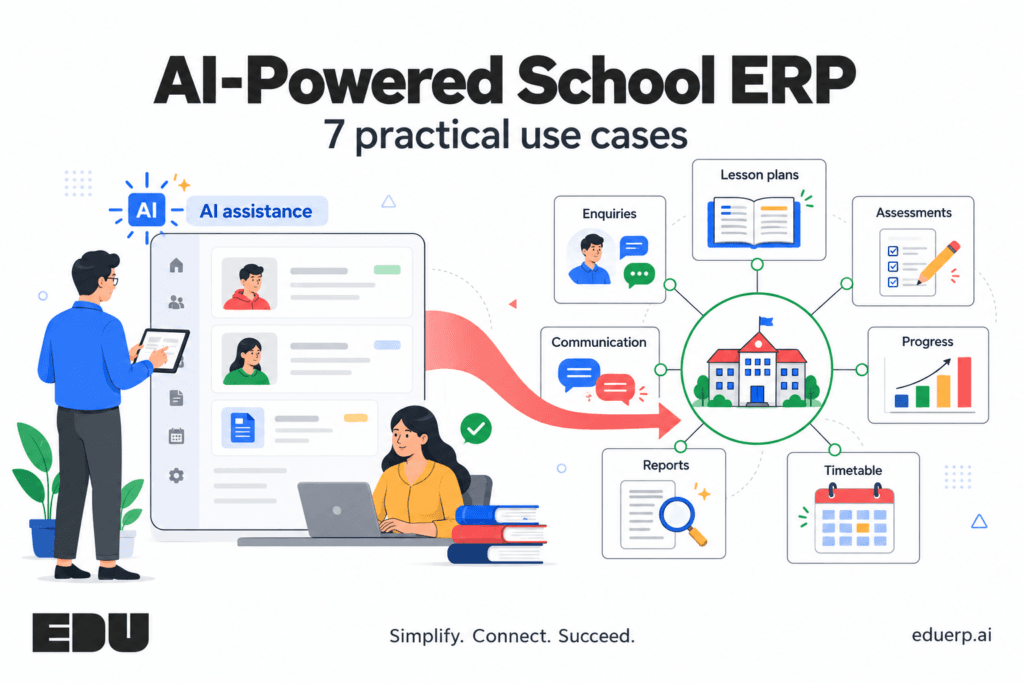
Choosing an AI-powered school ERP starts with understanding the work your school needs to complete. A parent is waiting for an enquiry update. A teacher is preparing next week’s lessons. The accounts team is checking fee receipts, while the principal needs a clear picture of attendance and academic progress.
Each task uses information the school already holds. The difficulty is bringing that information to the right person, in a form they can use.
An AI-powered school ERP brings AI assistance into the systems used to manage institutional work. Depending on the software, that assistance may help staff draft content, summarise records, examine patterns or explore scheduling options.
For a school evaluating software, start with a specific question: Which task will this feature help us complete, and how will we check the result?
The following seven use cases provide a practical way to evaluate AI in school management. Use them as areas to test during a demonstration, since availability and configuration vary between products.
What Is an AI-Powered School ERP?
A school ERP connects administrative processes such as student records, admissions, fees, attendance, HR and transport. A learning management system, or LMS, supports teaching activities such as lesson resources, assignments and assessments.
A school ERP with AI can add assistance within these workflows. For example, it may turn a long enquiry history into a short briefing, generate a draft assessment from teacher instructions or summarise patterns across academic records.
It helps to distinguish the types of functionality being offered.
| Type of functionality | Example | What to evaluate |
|---|---|---|
| Rule-based automation | Send a reminder when a payment becomes overdue | The trigger, exclusions and recipient list |
| AI assistance | Draft a message or summarise an enquiry history | Accuracy, relevant context and staff review |
| Analysis or optimisation | Identify patterns or propose timetable options | Input data, constraints and how results are checked |
A scheduled reminder can be valuable without using AI. Evaluate the task completed and the quality of the result before deciding what the AI functionality adds.
1. Help Counsellors Understand an Enquiry Before Responding
An enquiry may include calls, visit notes, messages and questions about eligibility, fees or transport. A counsellor taking over needs enough context to continue the conversation accurately.AI assistance can help summarise that history and prepare a follow-up draft. During evaluation, ask the vendor to show how the summary connects to the original notes and whether the counsellor can edit the response before sending it.
Try this in a demo: Use a sample enquiry containing a school visit, an unresolved transport question and a follow-up date. Check whether the summary preserves all three.Keep the stages clear: Lead CRM covers enquiry to admission-ready. Formal Admission Management begins with the application process. A summary should preserve the family’s actual stage without implying that an application or seat has been approved.
2. Help Teachers Prepare Lesson Plans
Lesson planning involves a learning objective, class level, available time, activities, resources and a way to check understanding.An AI planning tool may help prepare a first draft from those inputs. Its usefulness depends on whether the teacher can guide the output and adapt it to the class.
Try this in a demo: Request a lesson for a specific topic, duration and learning objective. Ask for an activity and an assessment question, then check their alignment.The teacher should review subject accuracy, language, accessibility and suitability for the learners. Also check how an approved plan connects to the school’s LMS and its teaching resources.
3. Assist With Assessment Content Preparation
Preparing questions requires choices about syllabus coverage, difficulty, marks and expected answers. AI-generated assessment content needs the same scrutiny as material prepared through any other method.A useful demonstration should show how a teacher specifies these requirements, reviews draft questions and changes unsuitable content.
Try this in a demo: Request a short assessment covering two learning objectives, with a defined marks distribution. Check for ambiguous wording, repeated questions, incorrect answers and material outside the intended syllabus.Confirm who can approve the assessment and release it to students. Question generation, answer evaluation and result publication are separate functions. Establish exactly which ones the product supports.
4. Support Review of Academic Progress
Attendance, assessment results and teacher observations provide different views of a learner’s progress. AI-supported analysis may help staff examine these records together and identify questions worth investigating.For example, a change in a student’s assessment performance may prompt a teacher to review attendance and assignment completion. These records help start a conversation; they do not establish the cause of that change.
Try this in a demo: Use anonymised sample records showing a change across two assessment periods. Check whether the system displays the underlying evidence, missing information and the period being compared.Teachers should interpret the findings in context. Progress summaries and report-card comments need review before being shared with families.
5. Explore Timetable Options Within School Constraints
A timetable must account for teacher availability, periods, subject loads, rooms and shared facilities. Ask how the software handles these constraints, whether through rules, optimisation or AI.
Try this in a demo: Make one teacher unavailable and reserve a laboratory for another class. Check the proposed timetable for clashes and unmet requirements.Look for clear explanations when a valid timetable cannot be produced. Staff should be able to adjust constraints, review alternatives and approve a schedule before it reaches teachers and students.The useful outcome is a workable schedule that respects the school’s requirements.
6. Turn Management Data Into Clear Summaries
A principal may need a quick view of attendance trends, assessment performance or fee collection. AI assistance may help prepare a narrative summary or interpret a question asked in ordinary language.Accuracy depends on clear definitions. “Fees collected this month” could refer to receipt dates, settlement dates or payments against a particular instalment.
Try this in a demo: Ask for a collection summary for one campus and date range. Verify the totals against the source report, including refunds and adjustments.Check whether users see only the information their roles permit. Summaries should identify the reporting period and give staff a way to inspect the underlying records.
7. Prepare Routine Communication for Staff Review
Schools send messages about meetings, timetable changes, assignments and administrative requirements. AI can help turn approved information into a clear draft for a particular audience.
Try this in a demo: Provide the date, venue, purpose and contact person for a parent meeting. Check whether the draft preserves those details and avoids adding promises or instructions.Confirm the review process, recipient selection and supported communication channels. Drafting a message and sending it are separate steps. Personal information should be included only where the recipient is entitled to receive it.
School ERP Buyer Checklist
Bring one realistic task from your school and ask the vendor to complete it using sample data. Then work through these questions.
| What to check | Question to ask |
|---|---|
| Current availability | Is this feature available in the proposed version and package? |
| Required data | Which records does it use, and what happens when information is missing? |
| Access | Does it follow staff roles and permissions? |
| Accuracy | Can we inspect the source records and verify the output? |
| Review | Who can edit, approve or reject the result? |
| Exceptions | What happens when the task cannot be completed correctly? |
| Connections | Which ERP and LMS workflows does it connect to? |
| Commercial scope | Are usage, setup, integration and support included in the quotation? |
Ask the vendor to separate available functionality, configuration work and roadmap commitments. This gives your team a clearer basis for comparing proposals.
Measure the Workflow Before and After a Pilot
Choose a small pilot with a defined task and an owner. Record how long the task takes, how often staff need to correct the output and whether the result completes the intended workflow.For a lesson-planning pilot, measure preparation and review time together. For reporting, check both the time needed to produce a summary and whether its figures agree with the source records.These measures help a school judge usefulness in its own setting. They also identify where data cleanup or staff training should come before a wider rollout.
How EDU Connects School Administration and Academics
EDU’s school ERP brings admissions, fees, attendance, examinations, transport and communication into a connected institutional platform. Its ERP modules cover administrative operations, while its LMS supports curriculum planning, online assessments, academic resources and progress tracking.A school ERP with LMS gives a school a useful starting point for evaluating connected workflows: choose a task, identify the records it needs and examine how the outcome moves into everyday work. Review AI assistance within that task separately, using a realistic demonstration.Bring your enquiry process, academic planning task or reporting requirement to an EDU demonstration. Review the functions available for your institution, the configuration needed and the responsibilities involved in implementation.
Simplify. Connect. Succeed.