


 Back
to listing
Back
to listing
The Digital Admissions Playbook for Schools & Colleges
The Digital Admissions Playbook
How Schools & Colleges Can Convert More Enquiries Into Enrolments-Without Paperwork, Follow-Up Chaos, or Data Leakage
Every admission season, the same scene plays out in thousands of institutions.
The admission office is busy. The phone is ringing. Walk-ins are coming. Counsellors are juggling visits. Parents are asking questions on WhatsApp. Someone is maintaining an Excel sheet. Someone else is updating a Google Form. The front desk has one version of the student’s details, the counselling team has another, and the accounts team is waiting for “confirmation” before it can issue a proper receipt. In the middle of all this, leadership is asking a simple question:
“How many seats will we actually fill?”
And the uncomfortable truth is: many institutions lose admissions not because of a lack of demand—but because the system breaks somewhere between enquiry and enrollment.
This is not about staff working hard or not working hard. Most admissions teams are overworked and doing their best. The problem is structural: admissions is a pipeline, but many institutions run it like a series of disconnected tasks. When information lives in different places, follow-ups become inconsistent, documents get missed, and decision-making becomes guesswork.
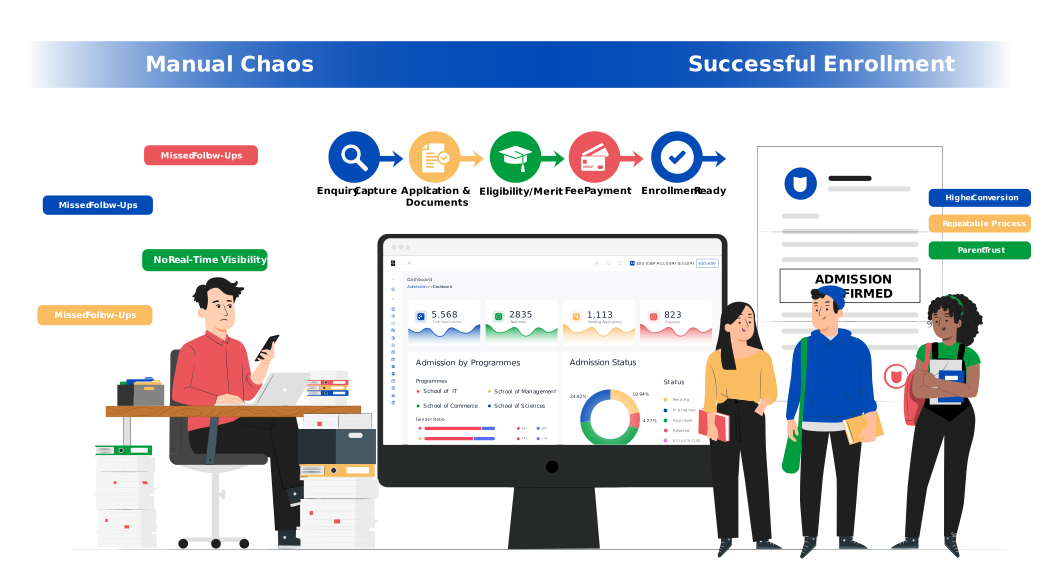
A digital admissions playbook isn’t “modernization for the sake of modernization.” It is a leadership tool that creates three outcomes that owners and principals care about:
- Higher conversion (you stop losing qualified leads)
- Lower chaos (work becomes repeatable, not heroic)
- Higher trust (parents experience clarity instead of confusion)
This article breaks down a proven, practical admissions framework that schools, colleges, and universities can implement—whether you are admitting 100 students or 10,000—using a structured digital admissions process supported by an online admission management system (often part of an education ERP / admission ERP).
Why admissions gets messy every year (even with good teams)
Let’s name the real reasons admissions becomes stressful:
1) Enquiries arrive from too many channels
Walk-ins, phone calls, website forms, Facebook/Instagram ads, referrals, agents, education fairs—every channel produces leads, but each channel also produces a different “format” of information. Without a system, the admission office ends up creating its own manual way to track things—often across registers, spreadsheets, and ad hoc tools instead of a single student admission software or school admission management software workflow.
2) The pipeline has too many handoffs
Admissions involves multiple stakeholders:
- front office / reception
- counselling team
- academic coordinators / HODs
- principal / director for approvals
- accounts team for fee confirmation
- sometimes hostel / transport admin too
Each handoff is a chance for delays or errors in the student enrollment process.
3) Staff become the “system”
When there is no unified process, admissions success depends on individual staff discipline. If a counsellor is strong, they convert more. If someone leaves mid-season, follow-ups collapse. The institution is not scalable—this is where admission workflow automation and a centralized admission management system for schools and colleges becomes important.
4) Documentation becomes the bottleneck
Parents are willing to share documents—but only if it’s easy. If the process is unclear or repetitive, families delay. And delayed documents often lead to delayed confirmation, which leads to lost seats—especially when document tracking isn’t built into an online admission portal or college admission management system.
5) Leadership lacks real-time visibility
At the top level, leadership typically wants to see:
- total enquiries
- applications in progress
- confirmed admissions
- pending fees
- drop-offs and reasons
But in manual systems, leadership sees a report only when someone compiles it—which means decisions come late. A digital admissions process solves these issues not by “adding technology,” but by designing a flow where data moves once, updates are automatic, and status is always visible—often via an integrated Student Information System (SIS) inside an education ERP.
The Digital Admissions Playbook (5 stages)
A well-run admissions pipeline is surprisingly simple. It has five stages:
- Enquiry Capture
- Application & Document Collection
- Shortlisting/Merit/Eligibility + Communication
- Fee Payment & Confirmation
- Enrollment Readiness & Reporting
Let’s go through each stage with practical steps, common mistakes, and what “good” looks like.
Stage 1: Enquiry Capture (Stop losing leads you already paid for)
In many institutions, the “leak” starts at day one. Leads come in, but:
- a call was missed
- a walk-in wasn’t recorded properly
- an online enquiry was read but not assigned
- an education fair list wasn’t uploaded in time
And the institution loses a potential admission without realizing it—one of the most common failures in the admissions workflow without a centralized student admission CRM.
What a strong enquiry system includes
A) One central enquiry inbox
Every enquiry—online or offline—should land in one place. Even if staff capture it manually, it should be in a standard format. This is a core requirement of any good admission management system and school admission software.
B) Source tracking
Ask a simple question: Where did this enquiry come from?
Source tracking helps leadership understand marketing ROI and shift spend intelligently—especially when using admission software for schools to track sources like website, walk-ins, referrals, and campaigns.
C) Automatic assignment
New enquiries should be assigned to a counsellor/team automatically by:
- grade/program
- region
- course interest
- workload distribution
This is a simple but high-impact part of admission workflow automation.
D) Same-day first response rule
Admissions is not only about information; it is about confidence. A slow response communicates disorganization—something a modern online admission management system can reduce via reminders and assigned ownership.
Common mistakes (and how to fix them)
Mistake: “We’ll call them tomorrow.”
Fix: Set an SLA (first response within X hours).
Mistake: Counsellors keep personal notes in WhatsApp.
Fix: Log every interaction in the enquiry record so the institution owns the data (and not individual devices).
Mistake: Walk-ins are not tracked properly.
Fix: Create a simple walk-in capture form at reception.
Leadership KPI for Stage 1
- Enquiries by source
- Response time (average + maximum)
- Enquiry-to-application conversion rate
Stage 2: Application & Document Collection (Remove friction, not control)
Once a family is interested, the next drop-off happens because the application feels painful.
A parent might say:
“I’ll fill it later.”
And later becomes never.
Or a student submits a form, but documents remain incomplete for weeks. And your team spends time chasing rather than processing—especially when there is no structured online admission process inside a dedicated admission management system for schools or college admission management software.
What a strong application flow includes
A) Online form with pre-filled details
If enquiry details already exist, avoid asking the parent to re-enter the same information.
B) Document checklist with status visibility
Instead of 10 follow-ups, the system should show:
- submitted
- pending
- rejected (with reason)
- approved
This document status clarity is a key part of a reliable student enrollment system.
C) Simple communication templates
Parents respond better to clarity than pressure. A standard message like:
“Your application is 80% complete. Pending: address proof + previous marksheet.”
reduces calls drastically—especially when communications are driven by the admission portal rather than individual follow-ups.
D) Internal verification workflow
For institutions, verification matters. But verification should happen inside a workflow, not inside random paper files—this is a common “make-or-break” capability in student admission software.
Common mistakes
Mistake: Asking for all documents at once without clarity.
Fix: Use staged collection—collect essential docs first, then remaining docs post-confirmation.
Mistake: Staff store documents in folders named by admission officer.
Fix: Store documents against the student application record.
Mistake: No ownership of document verification.
Fix: Assign verification responsibilities by department.
Leadership KPI for Stage 2
- Application completion rate
- Average days to complete documents
- Document rejection reasons (to reduce future errors)
Stage 3: Eligibility/Merit + Communication (Reduce uncertainty, increase trust)
Whether you’re a school selecting based on availability or a college/university using merit/eligibility, this stage is where parents decide:
“Can I trust this institution to be organized?”
People don’t mind waiting. They mind not knowing what is happening.
What a strong merit/eligibility stage includes
A) Transparent status updates
- Under review
- Shortlisted
- Interview/test scheduled
- Offer issued
- Waitlisted
- Not eligible (with respectful message)
These stage-wise updates are best delivered through a centralized college admission management system or online admission management system, not manual calls.
B) Interview/test scheduling (if applicable)
Slots should be visible and manageable. When scheduling is manual, it creates:
- clashes
- no-shows
- rescheduling chaos
C) Offer/seat blocking with clear timelines
If an offer is issued, define:
- seat hold validity
- payment deadline
- required actions
Common mistakes
Mistake: Parents keep calling because no one updates them.
Fix: Automate status messages at each stage.
Mistake: Counsellors give different information.
Fix: Standardize policy communication.
Mistake: Seat holding is informal.
Fix: Use formal “offer valid until” timelines.
Leadership KPI for Stage 3
- Offer acceptance rate
- Time from application to offer
- No-show rate for interviews/tests
Stage 4: Fee Payment & Confirmation (Where most institutions lose the seat)
This is the biggest conversion moment. A student may be fully ready to join, but:
- payment options are confusing
- receipts take time
- instalment policy is unclear
- accounts confirmation is delayed
And the parent chooses another institution that feels “easier.” This is why many institutions prefer an admission ERP or education ERP where admissions and fee confirmation connect.
What a strong payment & confirmation stage includes
A) Multiple payment modes (with instant status update)
Online payments should update the admission status automatically so nobody has to chase.
B) Fee structure clarity
Parents need to understand:
- what is included
- what is optional
- deadlines
- refunds/cancellation rules
C) Receipt generation + confirmation communication
The moment payment is recorded:
- receipt is issued
- admission is confirmed
- parent receives confirmation + next steps
D) Approval workflows for concessions/instalments
Exceptions happen. But exceptions should be governed.
Common mistakes
Mistake: “Pay and send screenshot.”
Fix: Use system-tracked payments wherever possible.
Mistake: Accounts confirms after 2–3 days.
Fix: Real-time reconciliation reduces delays.
Mistake: Concessions are verbal.
Fix: Keep approvals recorded.
Leadership KPI for Stage 4
- Offer-to-payment turnaround time
- Pending payment list by deadline
- Concession % and approval trail completeness
Stage 5: Enrollment Readiness & Reporting (Make the new session smooth)
Admissions is not “done” when the student pays. The student should enter the academic year with clean, complete data:
- correct personal details
- fee plan assigned
- transport/hostel assigned (if applicable)
- roll number / section allocation
- parent contact information verified
If this doesn’t happen, the first month of the session becomes messy, and staff waste time fixing data—especially when the institution lacks a unified Student Information System (SIS) integrated into its education ERP software.
What a strong readiness stage includes
- automated student ID creation
- section/class assignment workflows
- orientation/communication templates
- document completion reminders (for remaining docs)
- reporting dashboards for leadership
Common mistakes
Mistake: Data entry continues after admission is confirmed.
Fix: Capture correct data during application and verify systematically.
Mistake: Multiple versions of student data exist.
Fix: One master student record.
Leadership KPI for Stage 5
- % students fully verified before session starts
- No. of support tickets/corrections in first month
- Enrollment-ready list (per class/program)
The “Admissions Operating System” checklist
If you want to quickly evaluate your current admissions maturity, ask:
Enquiry
Do we capture 100% of leads in one place?
Do we track source and counsellor ownership?
Is first response within hours, not days?
Application + Documents
Do parents have a clear checklist?
Do we see “pending/approved/rejected” instantly?
Is document verification assigned and tracked?
Eligibility/Merit
Do parents always know the current status?
Do we have standardized messages and timelines?
Are interviews/tests scheduled systematically?
Payment + Confirmation
Does payment update admission status automatically?
Can we issue receipts instantly?
Are concessions/refunds controlled by approvals?
Enrollment readiness
Is the student record complete before the session starts?
Can departments access the same “single truth” record?
Are leadership reports available in real-time?
If you answered “no” to many, you don’t have a staff problem. You have a system opportunity.
Implementation guide (how to digitize admissions without overwhelming staff)
A common fear among principals and owners is:
“Will digitizing admissions disrupt the team?”
It doesn’t have to—if you implement in phases.
Phase 1 (Week 1): Enquiry capture + assignment + basic tracking
Goal: stop leakage, improve response time.
Phase 2 (Week 2): Online application + document checklist
Goal: reduce friction for parents, reduce chasing for staff.
Phase 3 (Week 3): Offer/merit + communication templates
Goal: build trust through consistent communication.
Phase 4 (Week 4): Payment workflow + instant confirmation
Goal: reduce drop-offs at the highest-conversion point.
Phase 5: Enrollment readiness workflows
Goal: smooth start of the academic year.
This phased approach prevents the most common implementation mistake: trying to do everything at once.
Where does EDU fit?
To run this admissions playbook effectively, institutions need a platform that supports:
- centralized enquiry tracking
- online applications and document workflow
- role-based access for different departments
- status-based communication
- payment tracking and confirmations
- reporting dashboards for leadership
- seamless handoffs from admissions to academic operations
EDU is designed as an education-focused ERP + LMS, with modules that align with how institutions actually operate—admissions, fees, examinations, attendance, timetable, and more. Your team can run admissions as a connected pipeline instead of fragmented tasks, so conversion rises while chaos reduces—using an integrated admission management system inside a broader education ERP software.
Admissions doesn’t fail because your team isn’t working hard.
It fails when enquiry, documents, approvals, and payment confirmation sit in different places.
If you want to see what a clean, trackable admissions pipeline looks like inside one system, we can show you the complete flow in EDU—from enquiry to confirmed admission—including document status, automated communication, and real-time visibility for management.